

Employee Dashboard Widget
Embed Vitable's employee benefits dashboard into your application with the Vitable Connect SDK.
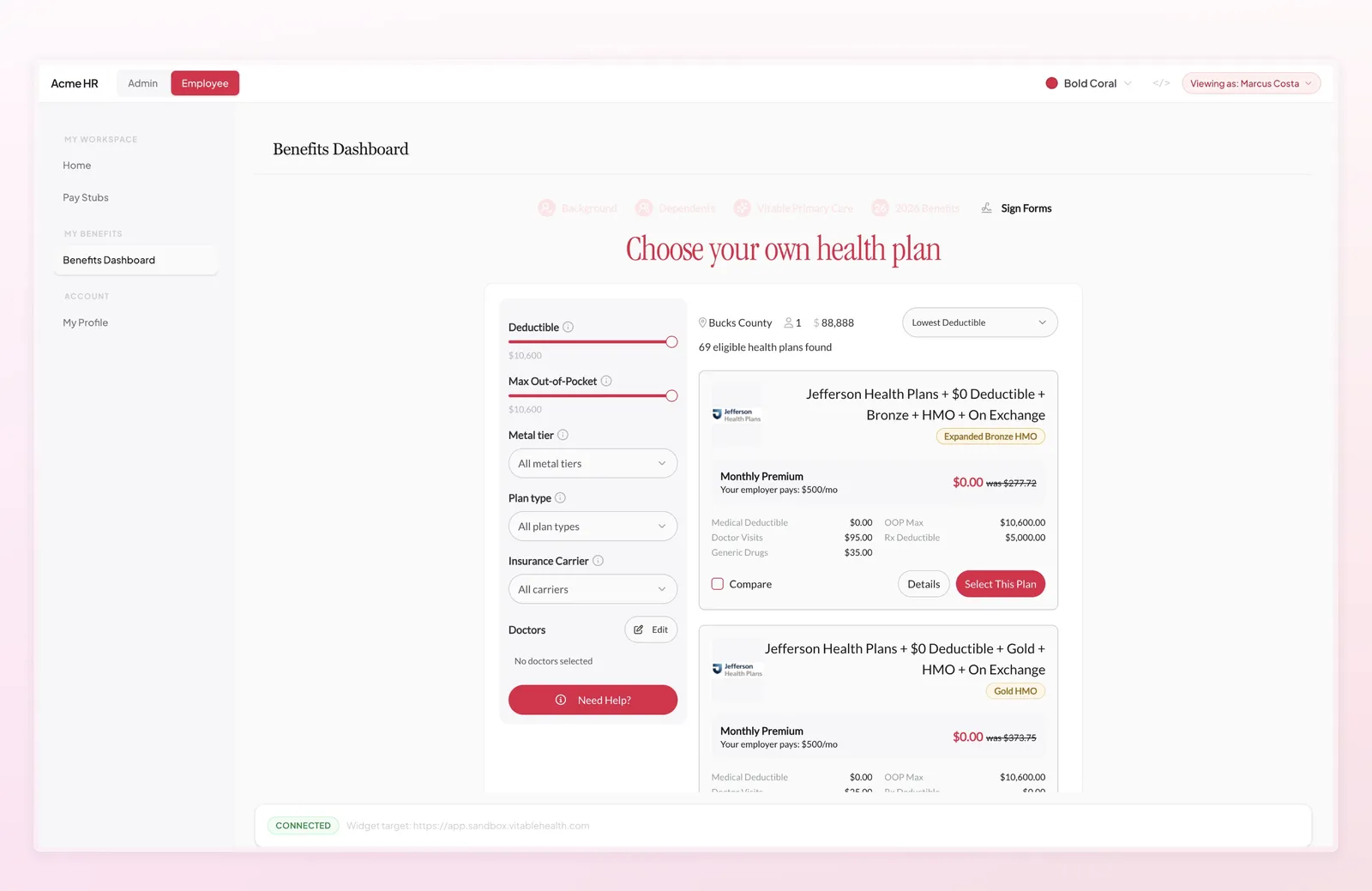
The Employee Dashboard widget lets you embed Vitable’s full employee benefits experience directly into your application. Employees can enroll in benefits, schedule appointments, and submit qualifying life events — all without leaving your platform.
The widget renders inside an iframe and communicates with your app through a secure postMessage bridge. The @vitable/connect SDK handles token management, message validation, and lifecycle events automatically.
Prerequisites
Section titled “Prerequisites”- A Vitable API key (see Authentication)
- The employee must already exist in Vitable’s system via the API
- React 18+ for the frontend SDK
Install the SDK:
npm install @vitable/connectSet Up
Section titled “Set Up”import { VitableConnectProvider, EmployeeViewWidget } from "@vitable/connect/react"import type { AccessTokenResponse } from "@vitable/connect/react"
const VITABLE_WIDGET_URL = "https://widget.vitablehealth.com"
function fetchToken(): Promise<AccessTokenResponse> { return fetch("https://my.backend.com/api/token", { method: "POST", headers: { "Content-Type": "application/json" }, body: JSON.stringify({ employee_id: "empl_abc123" }), }) .then((res) => { if (!res.ok) throw new Error(`Token fetch failed: ${res.status}`) return res.json() }) .then((data) => ({ token: data.token, expiresIn: data.expiresIn }))}
function App() { return ( <VitableConnectProvider baseUrl={VITABLE_WIDGET_URL} fetchToken={fetchToken} contextKey="empl_abc123" > <EmployeeViewWidget height="800px" onReady={() => console.log("Widget ready")} /> </VitableConnectProvider> )}Wrap your app with VitableConnectProvider, pass a fetchToken function that hits your backend, and drop in the EmployeeViewWidget. The SDK handles token refresh, secure iframe communication, and session lifecycle — you just wire up the data source.
Provider Props
Section titled “Provider Props”baseUrl string required
The Vitable widget server URL.
fetchToken () => Promise<{ token: string; expiresIn: number }> required
Callback that returns a bound session token from your backend. Called on mount and automatically on refresh.
allowedOrigins string[]
Origins allowed for postMessage communication. Defaults to the origin derived from baseUrl.
onError (code: string, message: string) => void
Global error handler for all child widgets.
contextKey string
Change this value to force a fresh token fetch (e.g., when switching employees).
Backend: Token Endpoint
Section titled “Backend: Token Endpoint”The Employee Dashboard widget requires a bound access token — a short-lived session token that is scoped to a specific employee. Bound tokens ensure the widget can only access data for the employee it was instantiated for, providing row-level security without exposing your API key to the browser.
Your server needs an endpoint that calls the Issue Access Token API to obtain a bound token for a given employee. The frontend will call this endpoint, so your API key stays server-side.
The request uses grant_type: "client_credentials" with a bound_entity that identifies the employee. The returned token is scoped exclusively to that employee — it cannot be used to access other employees’ data.
import osimport requestsfrom flask import Flask, request, jsonify
app = Flask(__name__)
VITABLE_API_URL = os.environ["VITABLE_API_URL"]VITABLE_API_KEY = os.environ["VITABLE_API_KEY"]
@app.post("/api/token")def create_token(): employee_id = request.json.get("employee_id") if not employee_id: return jsonify(error="employee_id is required"), 400
response = requests.post( f"{VITABLE_API_URL}/v1/auth/access-tokens", headers={ "Authorization": f"Bearer {VITABLE_API_KEY}", "Content-Type": "application/json", }, json={ "grant_type": "client_credentials", "bound_entity": {"type": "employee", "id": employee_id}, }, )
if not response.ok: return jsonify(error="Token request failed"), response.status_code
data = response.json() return jsonify(token=data["access_token"], expiresIn=data["expires_in"])Employee Dashboard Widget
Section titled “Employee Dashboard Widget”Place the EmployeeViewWidget anywhere inside the provider. It renders an iframe containing the employee benefits dashboard.
import { EmployeeViewWidget } from "@vitable/connect/react"
function Dashboard() { return ( <EmployeeViewWidget height="800px" onReady={() => console.log("Widget ready")} onError={(code, message) => { console.error("Widget error:", code, message) }} /> )}Widget Props
Section titled “Widget Props”Styling
Section titled “Styling”width string | number — default "100%"
Width of the iframe.
height string | number — default "600px"
Height of the iframe.
className string
CSS class applied to the iframe.
style CSSProperties
Inline styles applied to the iframe.
Callbacks
Section titled “Callbacks”onReady () => void
Fired when the widget iframe has loaded and is ready to interact.
onTokenExpired () => void
Fired when the session token has expired. The SDK handles refresh automatically — use this for logging or UI updates.
onAuthError (code: string, message: string) => void
Fired when authentication fails (e.g., invalid or revoked token).
onError (code: string, message: string) => void
Fired on any widget error.
Token Lifecycle
Section titled “Token Lifecycle”The SDK manages the full token lifecycle automatically:
- Initial fetch —
fetchTokenis called when the provider mounts. - Proactive refresh — The token is refreshed automatically 2 minutes before expiration. If the token lifetime is very short, the minimum refresh delay is 30 seconds.
- Retry with backoff — If a fetch fails, the SDK retries up to 3 times with exponential backoff (1s, 2s, 4s delays).
- Widget initialization — Once the iframe signals it’s ready, the SDK sends the token. The iframe acknowledges receipt before becoming interactive.
- Token updates — When the token is refreshed, the SDK pushes the new token to the iframe automatically.
- Expiration — If the token expires before a refresh succeeds, the iframe notifies the SDK, which triggers
onTokenExpiredand attempts a new fetch.
Changing the contextKey prop on the provider forces a full reset — the current token is discarded and fetchToken is called again. Use this when switching between employees:
<VitableConnectProvider baseUrl={VITABLE_WIDGET_URL} fetchToken={fetchToken} contextKey={currentEmployeeId}> <EmployeeViewWidget /></VitableConnectProvider>